

Content management systems (CMS) have come a long way in recent years. What was once mainly used to manage individual websites is now an important part of a company’s overall digital experience.
Content is no longer limited to websites. It needs to work across landing pages, apps, portals and commerce platforms. At the same time, companies are facing growing demands around personalization, international rollouts, governance and speed to market. That means choosing a CMS is about more than comparing features. The real question is which platform fits your business, supports your processes in the long run and works well with the systems you already have in place.
In this article, we look at what really matters when choosing a CMS, which criteria to consider and which common mistakes to avoid during the selection process.
What Is a CMS – and What Options Are There?
A content management system (CMS) provides the foundation for creating, managing and publishing digital content. It allows editorial, marketing and other business teams to manage content themselves instead of relying on IT for every change. Content can then be published across different channels and touchpoints.
Today, a CMS is therefore a central part of a company’s digital experience. Modern platforms come in different shapes and architectures, with the main differences being flexibility, integration and complexity.
Two approaches are particularly common:
Integrated, DXP-Oriented Platforms
Composable / API-First Platforms
Which approach makes sense for your organization depends on your existing systems, internal processes and long-term digital goals. Some companies need a centralized platform with strong governance and standardized processes. Others value flexibility and a more decoupled setup that allows them to respond quickly to new requirements.
So the decision is not just a technical one. It also has a strategic impact: it shapes how you manage, deliver and develop content in the future – and how well your CMS fits into your wider digital setup
When Is It Time for a New CMS?
Most companies don’t replace their CMS because it suddenly stops working. More often, the problems build up over time.
Here are some of the signs we commonly see with outdated CMS platforms:
Campaigns and landing pages take too long to publish
Marketing and editorial teams still depend on IT for simple changes
Content and assets have to be maintained in several places
International websites become increasingly difficult to manage consistently
Personalization and omnichannel delivery are hard to scale
There can also be technical reasons to rethink the existing setup:
Performance, security and compliance requirements are increasing
The current CMS is outdated and difficult to maintain or develop further
Replatforming or moving to the cloud is difficult with the existing architecture
Integrations with MarTech, commerce and data systems are limited
There is no central approach to content and asset management
Teams lack a consistent content operating model
If several of these points sound familiar, it may be time to take a closer look at your current CMS. Limited integration options, scalability issues and growing demands on the digital experience are often good reasons to reconsider the existing setup.
Learnings From the Field: Start With the Target State, Not the Platform
A CMS doesn’t operate in isolation. The modernization project of an international company, supported by our experts at diva-e Conclusion, is a good example of why the bigger picture matters. When selecting the new platform, the company looked closely at how it would work with its DAM, analytics and personalization tools, as well as its e-commerce system and existing IT landscape.
One major advantage was that the company had already defined a clear target state for its future digital experience, including roles and governance. Business, editorial, IT, security and operations teams worked together to define concrete use cases and look at migration requirements and integrations. This provided a solid basis for selecting an enterprise experience platform.
The vendor demos were also built around real business requirements. Using actual content and specific country and brand scenarios made it much easier to see how well each platform would support the use cases that mattered in practice. The first rollout was deliberately designed as a scalable foundation. This meant the platform could be expanded step by step after go-live without creating unnecessary technical debt from the start.
Key Criteria for Choosing a CMS
Many CMS evaluations start with long feature lists and vendor comparisons. But a good selection process starts earlier. First, define your business goals and concrete use cases. Then involve the people who will actually work with the platform – from marketing and editorial teams to IT, security and operations. These requirements can then be turned into clear criteria for comparing different platforms.
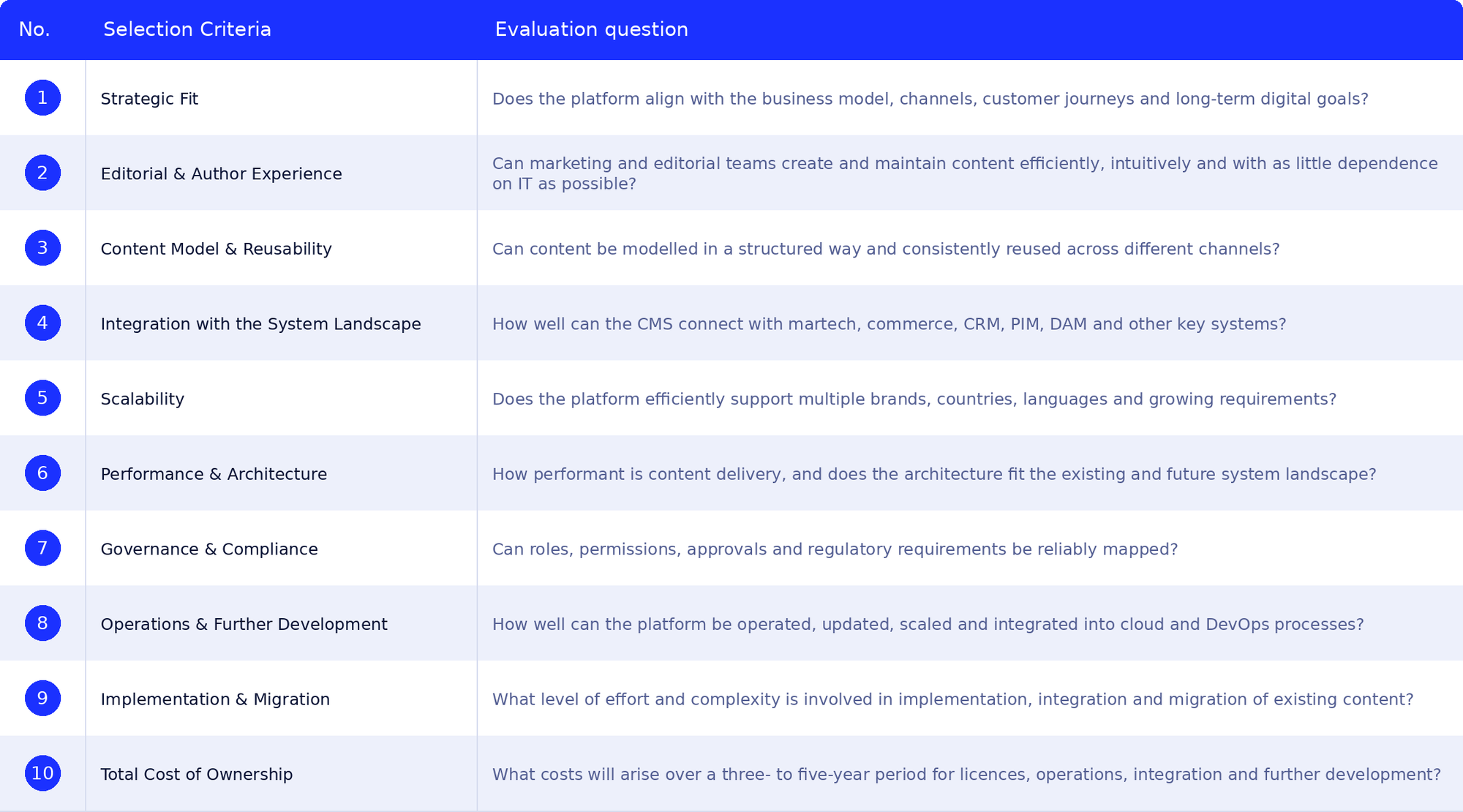
Many CMS evaluations start with long feature lists and vendor comparisons. But a good selection process starts earlier.
First, define your business goals and concrete use cases. Then involve the people who will actually work with the platform – from marketing and editorial teams to IT, security and operations. These requirements can then be turned into clear criteria for comparing different platforms.
Why CMS Architecture Matters
Features and usability are important, but so is the architecture behind the CMS. It determines how easily the platform can connect to your existing systems, how content can be delivered across different touchpoints and how well the setup can evolve over time.
Traditional CMS platforms typically combine content management and the frontend in one system. Modern platforms increasingly take a more flexible approach.
For companies with more complex digital requirements, two approaches are particularly relevant:
Bring content management, governance and workflows together in one central platform
Often include built-in capabilities for personalization, asset management and marketing
Make it easier to manage content, processes and the digital experience centrally
Are a good fit for complex organizations with strong governance and scalability requirements
Use a modular architecture and structured content
Separate content management from content delivery and support headless setups
Can be connected flexibly to existing systems and solutions such as commerce, PIM, DAM or marketing platforms
Offer more flexibility, but can also require more effort when it comes to architecture, integration and operations
There is no universally right approach – and the most fashionable architecture is not necessarily the best one for your business.
What matters is what fits your existing systems, processes and long-term goals. Hybrid approaches are also possible, and in practice the boundaries between the different models are becoming increasingly blurred.
Learnings From the Field: Start Small, Then Scale Internationally
Our customer dmTECH was also looking for a new CMS to modernize the career platform for the entire dm Group. The project started with a pilot: the dmTECH career portal was rebuilt on the new CMS platform. The goal was to create an employer experience that felt more like the customer experience people already knew from dm’s retail business.
The team chose a composable CMS architecture, which also made it easier to connect additional systems. After the successful go-live, the platform was gradually rolled out to other dm country organizations. Today, the CMS is used in more than 14 countries. It makes content easier to manage, supports faster rollouts and continues to evolve.
The project shows why it pays to think about scalability from the very beginning. A clearly defined pilot can help you test the architecture and processes in a real-world setting before rolling them out to additional markets.
Learn More About the dmTECH Project here.
How Future-Proof Is Your New CMS?
Functionality and technical fit are important, but so is the future of the platform itself.
Choosing a CMS is usually a long-term decision. You want a platform that can keep up with your business, adapt to changing requirements and grow with you over the years. That’s why it’s worth taking a close look at the vendor and its wider ecosystem. Some useful indicators include:
A clear and transparent product roadmap
Ongoing cloud-native development
Well-documented APIs with long-term support
Regular security and platform updates
A strong partner and developer ecosystem
Transparent support and operating models
References from companies with similar size and complexity
An ecosystem that can also cover related needs such as DAM, analytics, testing, personalization or commerce
The key question is simple: Can the platform evolve with you?
For a technology decision that is likely to stay in place for years, don’t just look at what the platform can do today. Consider how both the platform and the vendor are likely to develop in the future.
Tip: Think About AI-Driven Content Processes Early
AI is becoming an increasingly important part of content management, so it should also be part of your evaluation. Over the next three to five years, AI-supported content and asset workflows, automated content supply chains, and faster creation and optimization of landing pages are likely to become standard.
AI-powered personalization at scale, smarter content modularization and automated content delivery across headless and hybrid setups will also become more important. The result is a shift away from simply managing content toward more connected, automated and data-driven content operations – with AI increasingly connecting content, commerce and data.
What Does a CMS Really Cost?
When planning a CMS budget, it’s easy to focus on license fees. But the total cost goes well beyond the license.
You should also consider the effort and cost involved in:
Strategy and conceptual work
Websites, countries, brands and languages
Migrating existing content and assets
Integrating other systems
Quality assurance and testing
Training and change management
Translation and data cleansing
Ongoing operations and development
It’s also worth looking beyond the direct cost of the platform when measuring ROI. A successful CMS can, for example, help shorten time to market, reduce manual work, make better use of existing content and speed up the rollout of new websites, brands and countries.
Choose Your CMS in 3 Steps
Define Your Goals, Processes and Requirements: Before comparing platforms, make sure you know what you want the new CMS to achieve. Which business goals should it support? Which processes need to improve? And what will you need from the platform in the years ahead? This gives you a clear foundation for the technology decision.
Compare Platforms Using Real Use Cases: Feature lists rarely tell the whole story. Real use cases and measurable business goals make it much easier to compare vendors in a meaningful way and see how their platforms perform in situations that actually matter to your teams.
Get the Right Teams Involved Early: A CMS affects many parts of the business. Marketing, editorial, IT, data and security teams should therefore be involved from the beginning.
Bringing these perspectives together early helps you identify requirements, avoid surprises later and make a decision that works for the organization as a whole.
Conclusion
Choosing a new CMS is about more than picking the platform with the longest feature list. It’s about finding a solution that fits your business, your processes and your existing digital setup – and that can grow with you.
Our projects show how valuable it is to start with a clear target state, define real use cases and involve the right teams early on. Architecture, integration, scalability and the long-term direction of the platform and vendor all matter just as much as the features you need today. The right CMS is the one that supports your digital experience today while giving you enough flexibility to meet whatever comes next.
As an experienced digital transformation partner, we can help you find the right CMS – from strategy and evaluation through to implementation and ongoing operations.